Flight Strips
Flight strips tell you who the aircraft is, what it is doing, and whether the controller owes it an answer.

A busy desk can show strips in two columns so more of the traffic picture stays available at once.
At a glance
Section titled “At a glance”The status dot is a triage signal:
- Green means the aircraft is acting on its current instruction.
- Orange means it is waiting on the controller.
- Yellow means a controller clearance is pending for the aircraft.
- Cyan means the aircraft is transmitting.
Use the dot to decide where to look first, then check the aircraft’s status and the surrounding traffic before acting.
Read the strip
Section titled “Read the strip”A strip can carry the callsign and aircraft type, runway information when relevant, a compact status summary, pilot satisfaction, and annotations such as an acknowledged request or a hold-short restriction.
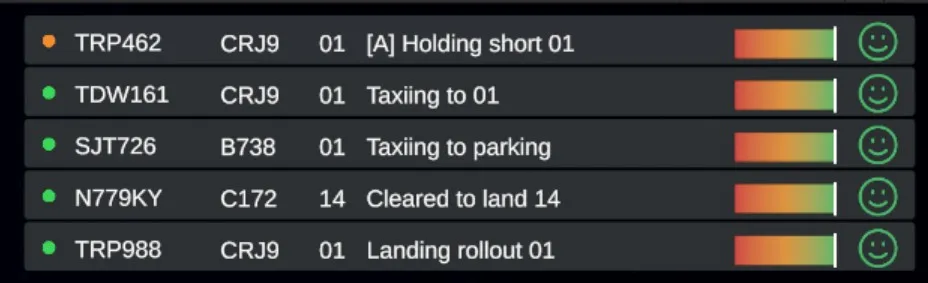
Read across a strip for the aircraft identity, runway or destination context, current activity, and satisfaction signal.
Selecting a strip selects that aircraft for the clearance panel.